Technical Support for ASEBA® Software Products
How do I download and print the profile and narrative report?
< 1 min read
**Please note, this will be the same for ASEBA-PC, ASEBA-Network, and ASEBA-Web.**
- Log in to ASEBA-PC, ASEBA-Network or ASEBA-Web.

- Click on the assessed person on the left-hand side of the screen, Click on the form to download or print, then click the Score Report button


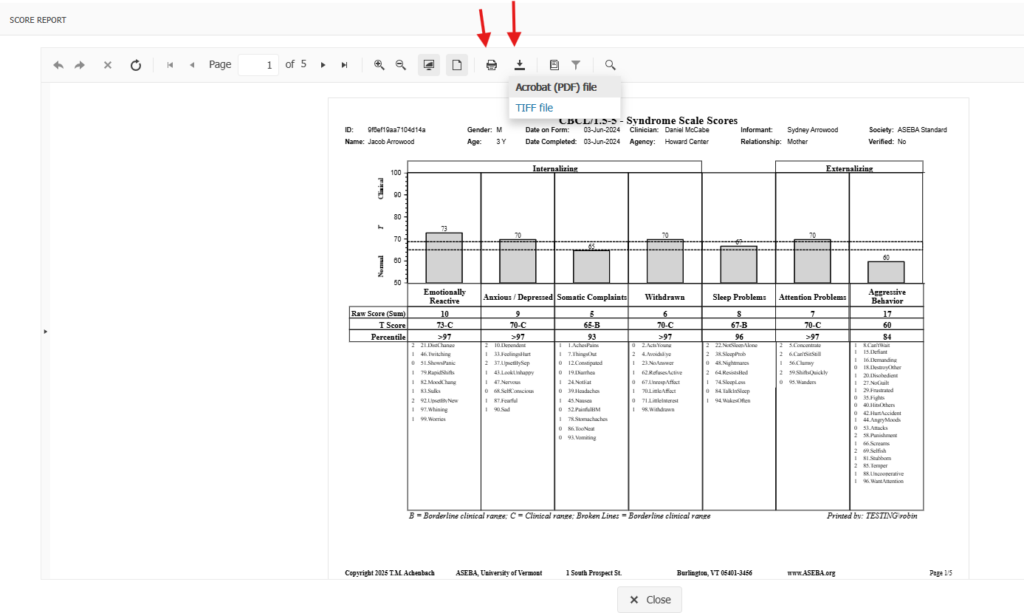
3. Click on the download arrow and then choose the selected format (either PDF or TIFF). The file will automatically download to the downloads folder, otherwise, click on the print icon to print the report. The narrative is the last page. There is no charge for downloading or printing reports.